
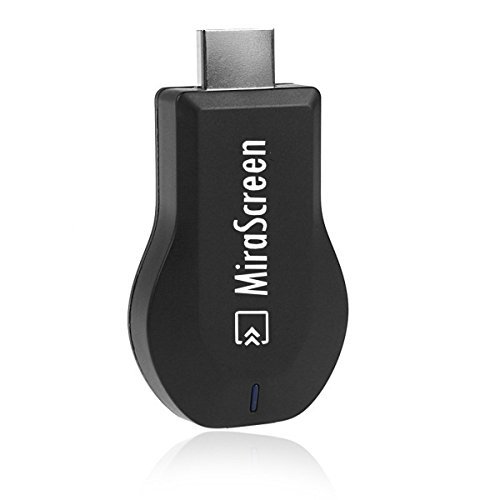
Wifi Display Dongle Miracast DLNA Airplay Wireless display HDMI adaptor TV Stick dongle for iPhone Android IOS
Price Rs. 9,285.00 (not confirmed)
Product Code:
B076CJF8CH
Brand:
Weight:
0.40 lbs
Availability: In stock in the US ✔
Import from USA in Pakistan ✔
Important: Delivery of this product will take 3 to 4 weeks.
- This product price is not confirmed on our website because Amazon prices may change at any time, and currency exchange rates fluctuate regularly.
- Before confirming any order, our sales representative will share the final price, including all taxes, customs duties, government charges, freight, and local shipping. You will receive the complete doorstep price. Also salesperson will confirm product is in stock or not
- Before ordering any product, please make sure the product technically fulfills your need and contains no illegal ingredients (e.g., wine, alcohol, pig, pork, animal-based gelatin, etc.) or contents.
- In most cases, our product delivery time is 10 to 20 working days. However, in special circumstances such as weather conditions or other unforeseen delays, this timeframe may vary.
- We are not technical persons. For technical support or manufacturer's warranty of the products found on shoppingbag.pk, you can contact directly with the original manufacturer or visit their website.
- We are your importer of goods from the USA, UK, China, Russia, etc., and will not provide any technical support, product warranty, or quality check.
- Our enlarged and enhanced product pictures may differ slightly from the original products. Also, read product reviews and ratings before buying.
- We require a 30% advance on the final price, and the remaining balance is payable at the time of delivery.
- We are assuming you have read our terms & conditions and agreed with them.
Product Detail
Please Download "Ouick install Guide" from product detail page if you don t know how to use it.
Package Including: 1 x wifi dongle 1 x 2in1 cable 1 x User Manual
How to install: Step 1: Connect WiFi cable (micro USB head) to MiraScreen dongle. Step 2: Plug the MiraScreen dongle into the HDMI port of your TV and switch to the right input source. Step 3: Plug USB cable into TV USB port or an external USB power adapter (5V/1A). Step 4: Display MiraScreen Main Page.
AirPlay Mirroring for iOS (iPhone/iPad) Step 1: Switch to Airplay mode by pressing button on dongle Step 2: Get SSID and password on screen Step 3: Establish WiFi connection between iOS device and MiraScreen. Step 4: Turn on Airplay and select MiraScreen s SSID. Then start mirroring.
MiraCast Mirroring for Android: Step 1: Switch to Miracast mode by pressing button on dongle Step 2: Miracast mode ready Step 3: Find the Miracast function on your Android device (such as screen mirroring/Miracast/smart view). Binding: ElectronicsBrand: WristelColor: black-3EAN: 6926265353849IsAdultProduct: Label: WristelManufacturer: WristelMPN: donglePackageQuantity: 1PartNumber: dongleProductGroup: Home TheaterProductTypeName: TUNERPublisher: WristelStudio: WristelTitle: Wifi Display Dongle Miracast DLNA Airplay Wireless display HDMI adaptor TV Stick dongle for iPhone Android IOS